Five Ways Unison’s Check-in Kiosk Makes Volunteer Tracking Easier
Less paperwork after every shift. See how Unison’s Check-in Kiosk helps you track attendance, document service hours, and report on volunteer participation.


The annual report deadline is a week away. Volunteers’ contributions deserve a place in that story: the time they give helps your organization carry out its mission. But if service records are scattered across sign-in sheets, spreadsheets, and schedules, showing their impact means sorting through a pile of paperwork first.
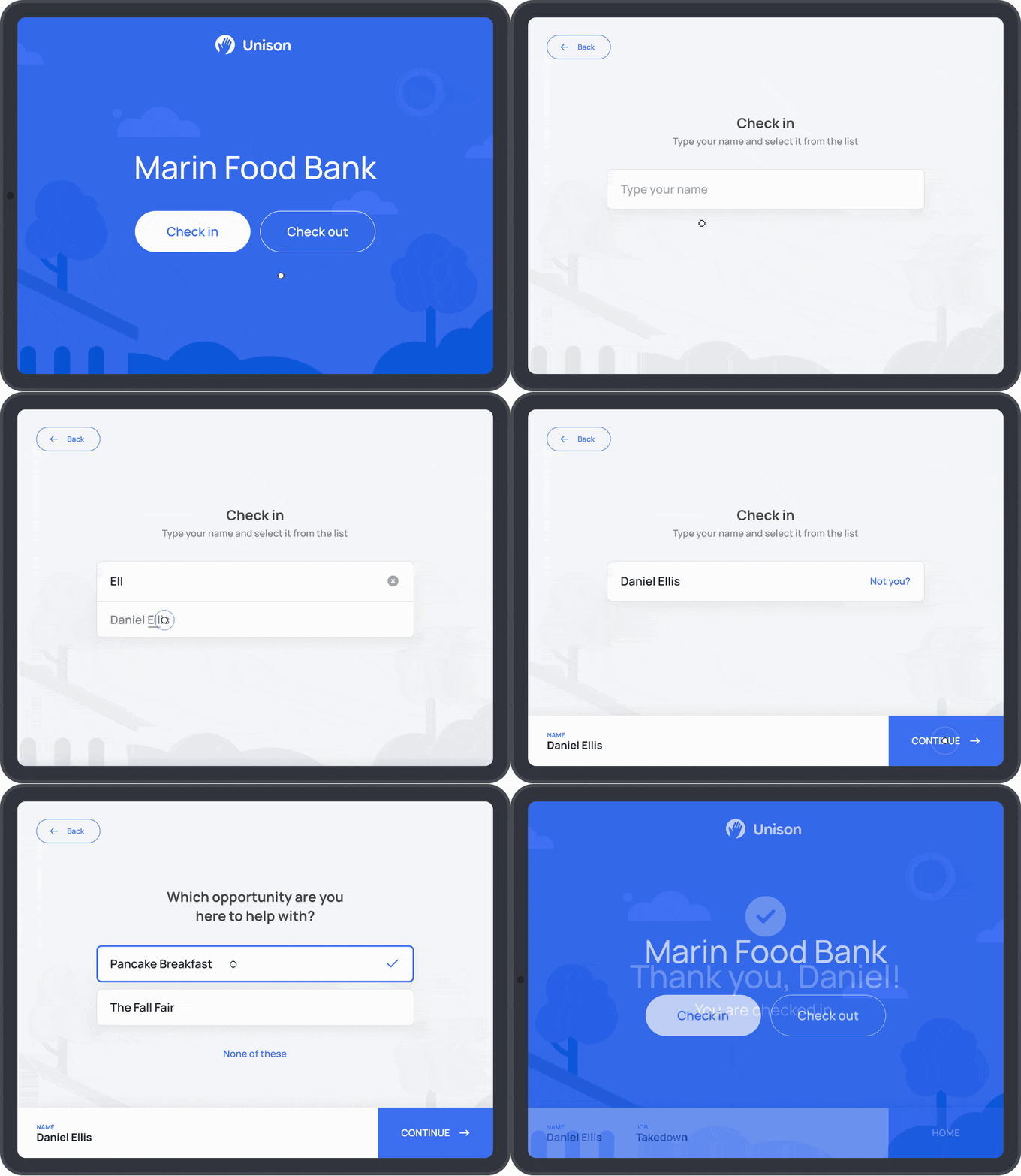
Unison’s new Check-in Kiosk, available with Unison Pro, makes it easier to capture those contributions as volunteers serve. At the Kiosk, volunteers check themselves in when they arrive and check out before leaving. Unison records their attendance and service hours, ready for your next report.
Here are five ways the Check-in Kiosk can support your volunteer program.
1. Spend less time sorting through sign-in sheets
A pile of sign-in sheets can mean another round of administrative tasks after a busy week. You have names to decipher, hours to enter, and records to match to the right volunteers.
Unison’s Check-in Kiosk records that information as volunteers arrive and leave, cutting down on the data entry afterward. Volunteers check themselves in at the Kiosk, then check out before heading home. Their attendance and service hours are saved in Unison’s Logs, a running record of when they served and how much time they contributed.
Check-in Kiosk In Action: An animal shelter sets up a tablet near its volunteer entrance. Volunteers walking dogs, cleaning enclosures, or helping with adoption events check in and out at the Kiosk, so the coordinator can spend less time entering hours afterward.
2. Capture the hours volunteers actually serve
Track the time volunteers contribute, including the extra help that doesn’t appear on the schedule. When volunteers check in and out at the Kiosk, Unison uses those times to calculate their service hours.
For recurring shifts, small differences add up over the weeks and months. A volunteer signup sheet won’t tell you who stayed late or left early. Check-in and check-out times in Unison capture the time people actually served.
Check-in Kiosk In Action: A food bank volunteer stays another half hour to finish packing boxes for tomorrow’s deliveries. When they check out at Unison’s Kiosk, that extra time counts toward their recorded service hours. Another volunteer leaves early for an appointment, and Unison records the shorter time served.
3. Prepare for volunteer reporting
Managing volunteer opportunities in Unison keeps attendance and service records together throughout the year, so preparing a report doesn’t mean starting from scratch. With the Kiosk, you can review how many volunteers served and the total hours they contributed across your organization or for a particular opportunity.
Use those records for:
- Annual reports that show volunteers’ contributions to your mission.
- Grant reports that document volunteer support for a funded program.
- Board updates that highlight participation across the organization.
Check-in Kiosk In Action: A museum preparing its annual report reviews how many volunteers supported its education programs and how many hours they contributed to a new exhibition. Because volunteers check in and out at the Kiosk, their attendance and hours are already recorded. The team can focus on storytelling—not digging up attendance records.
4. Report and recognize individual volunteers’ service
Find an individual volunteer’s service hours in Unison without searching through months of paperwork. You can confirm their participation for school or a program requirement, or recognize the hours they’ve contributed over time.
Check-in Kiosk In Action: A student needs to submit volunteer hours at the end of the semester. Their check-ins and check-outs at Unison’s Kiosk build a service history you can use to confirm their hours, even if they served across several opportunities.
5. Follow up with no-shows
Missed shifts are a common volunteer scheduling challenge that affects your team and the people your organization serves. Tracking attendance helps you identify those gaps and reconnect with volunteers before their next assignment.
The Kiosk helps you see which scheduled volunteers missed a shift. If a scheduled volunteer doesn't check in or check out, Unison records a no-show in Logs. You can use that record to start a conversation about their availability or whether a different shift would be a better fit.
Check-in Kiosk In Action: A free clinic coordinator notices a no-show for a front-desk shift in Unison’s Logs. After reaching out, the coordinator learns that the volunteer’s class schedule has changed and helps them find a shift they can attend regularly.
Bring the Kiosk to your next volunteer opportunity
You don’t need special equipment to get started. Enable the Kiosk for an opportunity, open your organization’s kiosk link on an iPad or another internet-connected device, and place it where volunteers normally arrive. Let everyone know to check in before starting and check out before heading home.
The Check-in Kiosk is included with Unison Pro. If you’re already using Pro, try it with one of your recurring opportunities. Using another edition or exploring Unison for the first time? Take a look at Pro for volunteer management, attendance tracking, and service-hour reporting.
Frequently asked questions about the Check-in Kiosk
Can Unison’s Check-in Kiosk be used for multiple volunteer opportunities?
Yes. Your organization’s Check-in Kiosk link works for all volunteer opportunities where you’ve enabled the Kiosk. You choose which opportunities use it.
How does Unison calculate volunteer hours if someone forgets to check in or out?
If a volunteer checks in but forgets to check out, Unison uses the scheduled shift end time to calculate their hours. If a volunteer checks out without checking in, Unison uses the scheduled shift start time. You can manually adjust volunteer hours in Unison’s Logs.
When does attendance recorded through the Check-in Kiosk appear in Unison’s Logs?
Attendance and volunteer hours recorded through the Check-in Kiosk appear in Unison’s Logs about three hours after the shift ends.
Which Unison edition includes the volunteer Check-in Kiosk?
The Check-in Kiosk is included with Unison Pro. Explore Unison’s volunteer management features to learn how Unison supports your program from recruitment through reporting.
